Integration with CRM SalesDrive for UTP, UPP, UT, 2.3, and other configurations on standard forms. Bidirectional exchange with SalesDrive
Standard Integration Functionality:
-
Uploading deals from CRM "SalesDrive" to the accounting system in real-time;
-
Two-way exchange of order statuses between CRM "SalesDrive" and the accounting system;
-
Automatic creation of counterparties (clients/suppliers) in the accounting system when uploading a deal from CRM "SalesDrive".
Additional Functionality (paid separately):
- Uploading items/products from CRM "SalesDrive" to the accounting system while preserving the nomenclature folder structure;
- Exporting items/products from the accounting system to CRM "SalesDrive";
- Exporting stock balances to CRM "SalesDrive";
- Uploading payments from CRM "SalesDrive" to the accounting system, linked to customer orders;
- Uploading payment data from the accounting system to CRM "SalesDrive";
- Uploading payment receipts from CRM "SalesDrive" to the accounting system;
- Loading additional transaction characteristics from the CRM "SalesDrive" into the accounting system:
- Delivery method;
- Shipping/Sender;
- Prom.ua website;
- Website page;
- Advertising campaign;
- Source;
- Company (utm_campaign);
- Channel.
- Using item characteristics when loading transactions into the accounting system;
- Exporting prices to CRM "SalesDrive";
- Exporting cost price/prime cost to CRM "SalesDrive";
- Automatic generation of an expense invoice in the accounting system based on the buyer's order/invoice according to the order/invoice status "Shipped";
- Formation of the document "Closing the buyer's order" based on the document "Buyer's order", if the order status is "Cancellation";
- Formation of the document "Invoice for return of goods" in the accounting system, based on the "Outgoing invoice for goods", if the outgoing invoice exists and the status "Cancellation" appears in the buyer's order.
- Delivery method;
- Shipping/Sender;
- Prom.ua website;
- Website page;
- Advertising campaign;
- Source;
- Company (utm_campaign);
- Channel.
Implemented for configurations:
- UTP. Commercial Enterprise Management;
- UVP. Manufacturing Enterprise Management;
- For other configurations on standard (ordinary) forms (implemented upon request).
Why choose our solution:
- Over 50 integrations in 5 years (we have been working in this direction since 2021);
- Ability to change data exchange settings between "SalesDrive" and the accounting system in "1C:Enterprise" user mode, rather than via "Configurator" by a programmer. Everything can be configured directly from the accounting system, including algorithms for populating attributes, namely:
- matching the document type in "SalesDrive" ("Deal") with the document type in the accounting system ("Customer Order" or other);
- matching the attributes of the "Deal" in "SalesDrive" with the attributes of the selected document type in the accounting system;
- matching directory values in "SalesDrive" with directory values in the accounting system (For example: you can map deal statuses in "SalesDrive" to the corresponding customer order statuses in the accounting system, and similarly for directories like "Delivery Types", "Payment Types");
- in the accounting system settings, you can modify algorithms and formulas for attribute calculation, change the calculation sequence, and add virtual attributes to be used in algorithms when populating other actual attributes of the tabular section and header attributes.
- The integration module successfully operates with large data exchange volumes - 300 orders per day, 20,000 products for exchange.
- Stock balance synchronization between "SalesDrive" and the accounting system is carried out only for products from new or modified documents that generate inventory movement and change warehouse stock levels.
- Logging of all data exchange tasks between "SalesDrive" and the accounting system. Each exchange with "SalesDrive" is a separate event characterized by a specific attribute: what information is sent or received between the accounting system and "SalesDrive", what response was received, which accounting system object was modified or created, and the execution status of the event — "Completed", "Processed without changes", "Error". If it is an error, the specific error details are provided.
- matching the document type in "SalesDrive" ("Deal") with the document type in the accounting system ("Customer Order" or other);
- matching the attributes of the "Deal" in "SalesDrive" with the attributes of the selected document type in the accounting system;
- matching directory values in "SalesDrive" with directory values in the accounting system (For example: you can map deal statuses in "SalesDrive" to the corresponding customer order statuses in the accounting system, and similarly for directories like "Delivery Types", "Payment Types");
- in the accounting system settings, you can modify algorithms and formulas for attribute calculation, change the calculation sequence, and add virtual attributes to be used in algorithms when populating other actual attributes of the tabular section and header attributes.
-
"Order. Additional status actions",
-
"Order. Sending modified status",
-
"Order. Creation of linked documents",
-
"Products. Sending changes",
-
"Products. Sending stock balances".
Core Functional Capabilities
1. Request Exchange (Orders).
In the "Customer Orders" log within the accounting system, orders exported from "SalesDrive" are displayed and marked with a logomark. The log also duplicates CRM information such as number, status, payment state, amount, date and time of order creation, and the customer's last and first name.
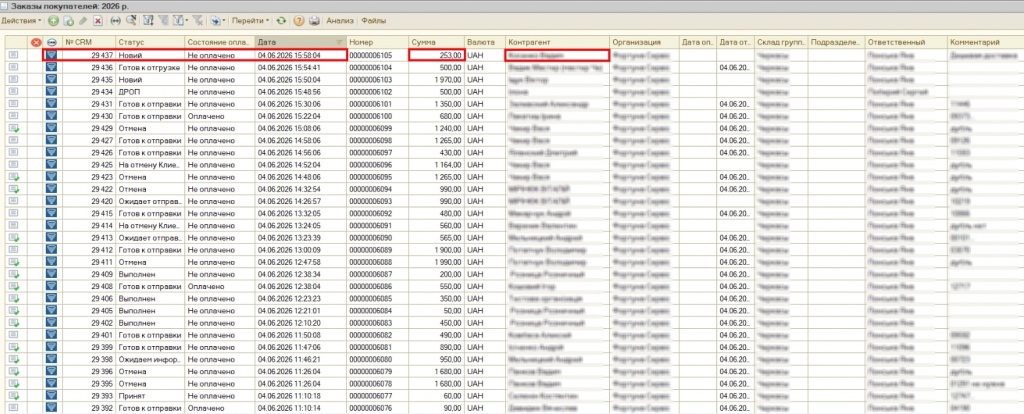
Fig. 1. "Customer Orders" log in the accounting system.
2. In the "Data List Values" log under the "Directories" section of the accounting system, you can manually configure additional settings, for example, choosing automatic sales invoice creation for a given order status, such as the "Completed" status.
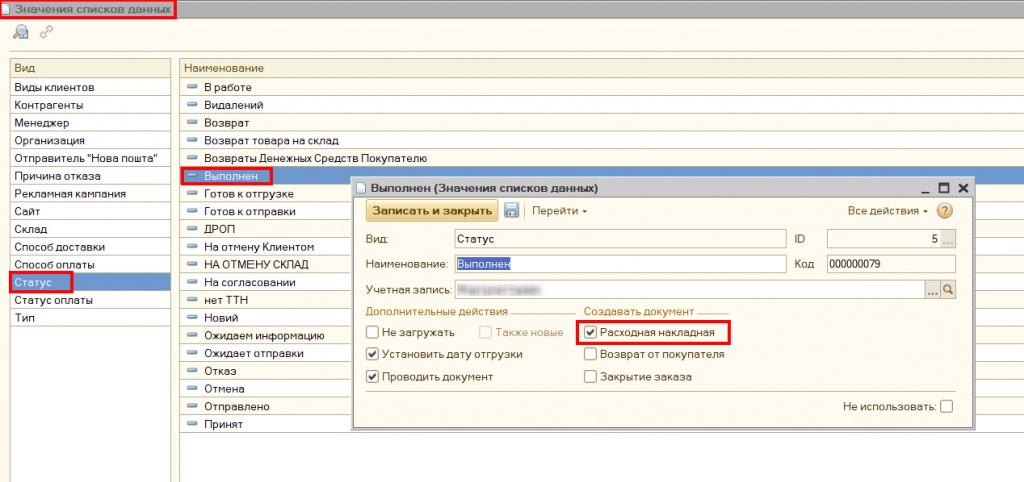
Fig. 2. Additional settings for a specific order status.
3. In the "Data List Values" log under the "Directories" section of the accounting system, CRM values that have no mapping set to an accounting system value are highlighted in pink. To set this mapping, you need to use the "chain" icon.
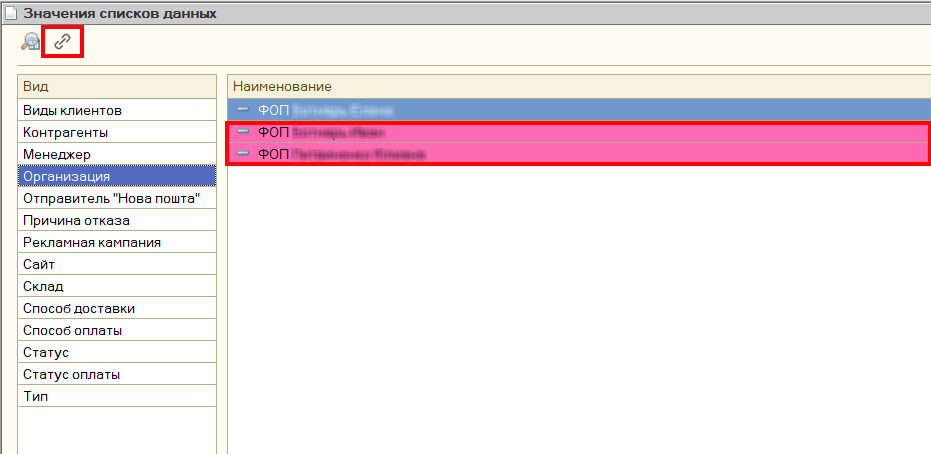
Fig. 3. Setting up data mapping.
4. Exporting Payment Data from the Accounting System to CRM "SalesDrive".
Non-cash payment data in the accounting system is exported to "SalesDrive". The payment is displayed in the client's profile in CRM "SalesDrive" as unlinked to deals, and it can then be manually linked to the specific deal under which the payment was made.
5. Integration Logging.
In the "Order Data" log under the "Logging" section of the accounting system, event statuses are displayed: in green – "Completed", in blue – "Completed without changes", in red – "Execution Rejected", and in yellow – "Execution Errors". The order number, date, event download time, and subsequent processing time are also displayed.
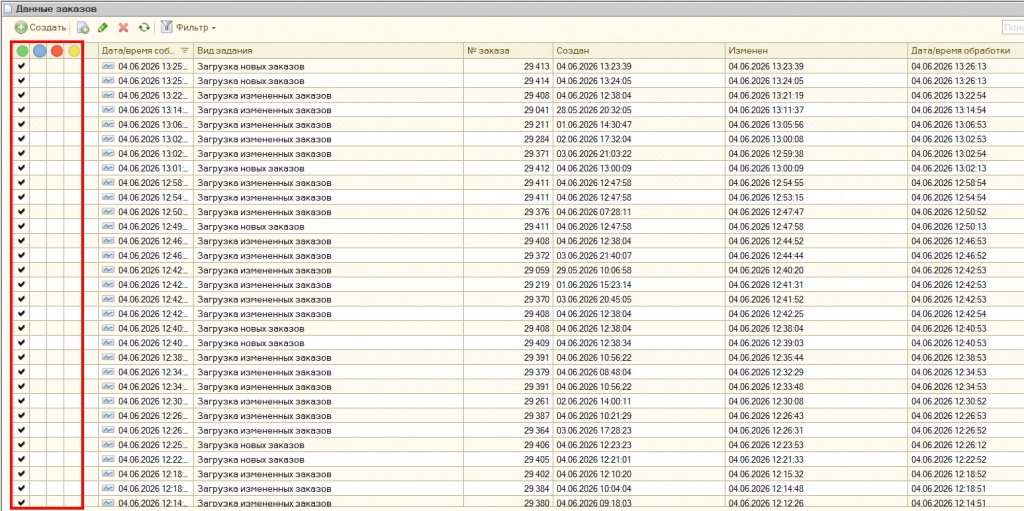
Fig. 4. "Order Data" log in the "Logging" section.
6. From the "Order Data" log in the "Logging" section of the accounting system, you can open the order details, where the processing result will be visible, and you can navigate directly to the "Order" document itself.
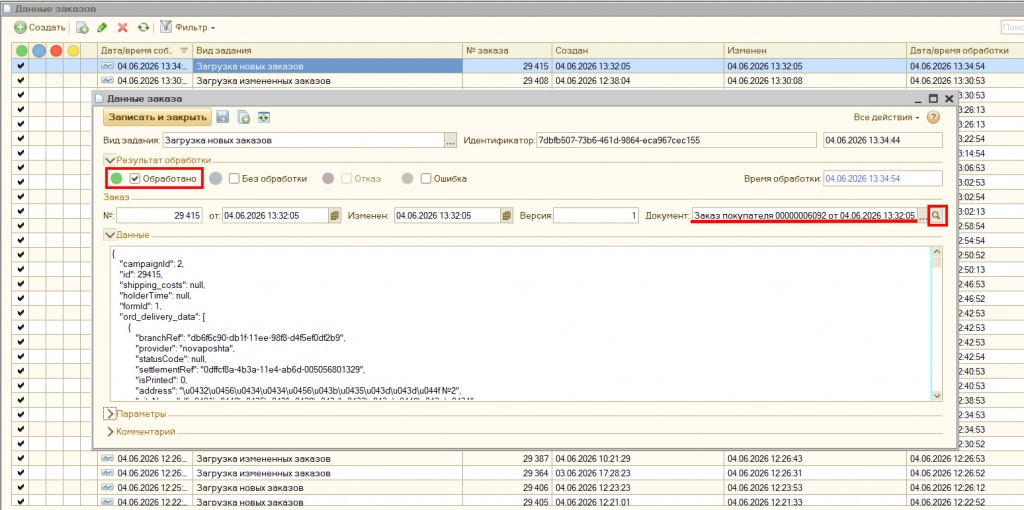
Fig. 5. Order data in the "Logging" section.
7. In the "Tasks" log under the "Directories" section of the accounting system, tasks that can be included in the integration are displayed. Inactive tasks are shown as strikethrough text.
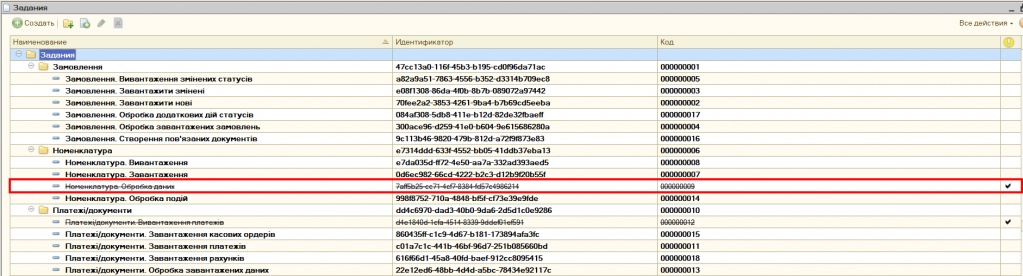
Fig. 6. Tasks available for integration.
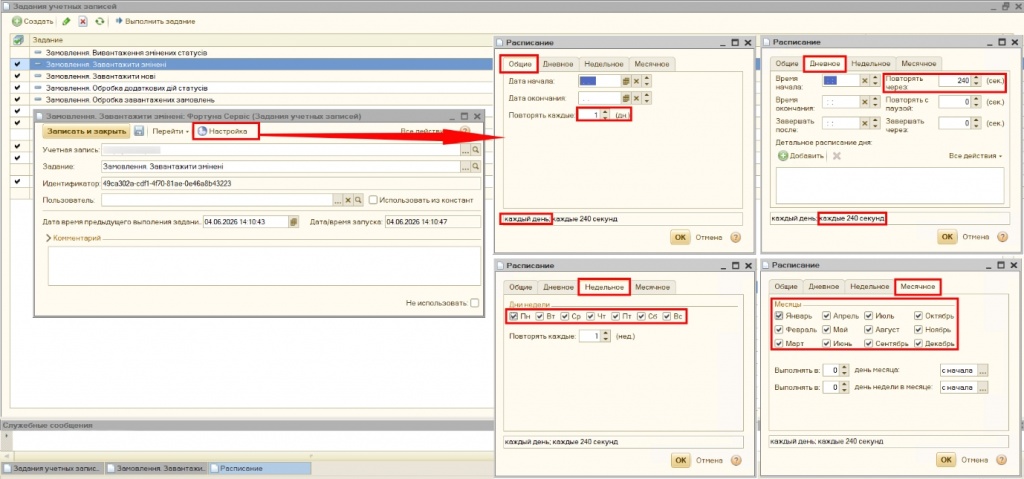
Fig. 7. Configuration of account tasks.
9. In the "Events" log under the "Logging" section, all events resulting from data exchange between the accounting system and "SalesDrive" are displayed. You can easily sort them by the following values:
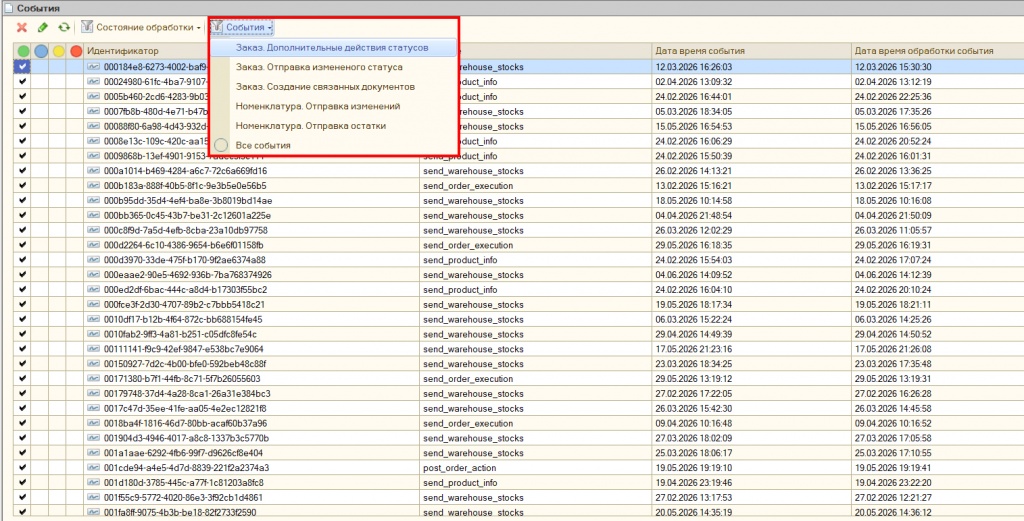
Fig. 8. "Events" log in the accounting system.
10. In the "Events" log under the "Logging" section, all events resulting from data exchange between the accounting system and "SalesDrive" are displayed. If you open an event, you can view exactly which document triggered it and, if necessary, open it (by clicking the paw icon); the items involved in the process are also shown (displayed in SalesDrive ID format).
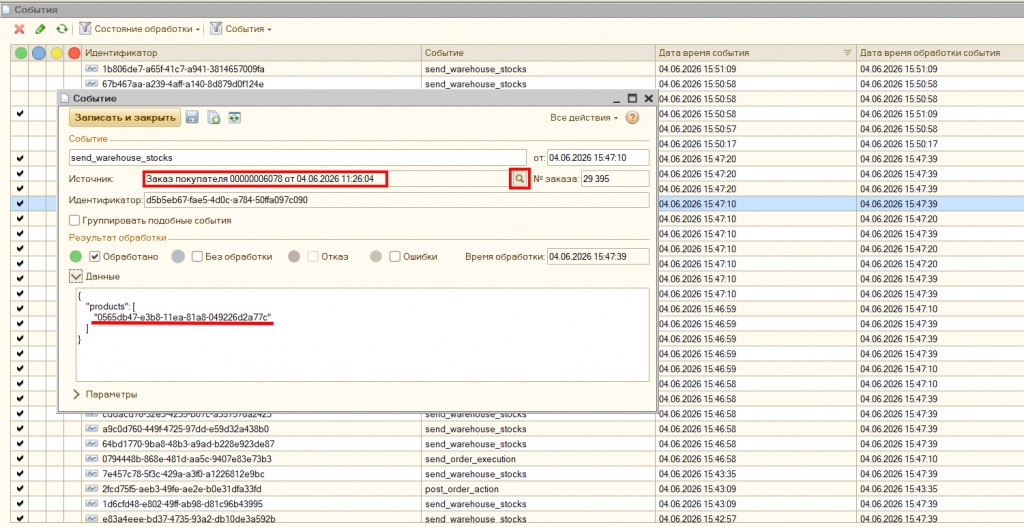
Fig. 9. Additional event details.
Basic principles of module configuration
1. Receiving an order/pre-order via WebHook.
When an order is created or its status is changed on the "SalesDrive" side, a notification with order data is sent. On the accounting system side, it is received by the HTTP service.
Result:
a) An order and its status are created/changed in the accounting system;
b) The number of the created document is sent (via API) to "SalesDrive" (if allowed by the corresponding setting).
2. When the order status changes in the accounting system, the status value is sent to "SalesDrive" (via API) (if allowed by the corresponding setting).
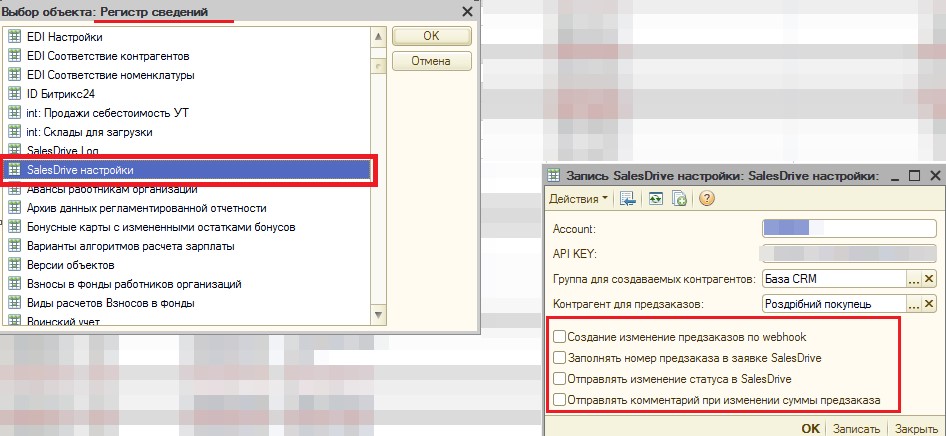
3. Since the "SalesDrive" API does not support changing the order amount, when the order/pre-order amount is changed in the accounting system, the line "Attention: order amount changed - 0000.00 UAH." is added to the order comment in the accounting system, and the comment value is sent (via API) to "SalesDrive".
Fig. 1. Configuring integration with "SalesDrive".
Authorization parameters for working with the API (Account and API key) are specified in the integration settings.

Fig. 2. How to find Account and API Key parameters (1).

Fig. 3. How to find Account and API Key parameters (2).
To receive Webhooks, you need to publish the integration HTTP service (named SalesDrive) and configure port forwarding.
As a result, you should get a URL of the following format:
http://<external IP>:<port>/<publication name>/hs/SalesDrive/WebHook
It must be specified in the SalesDrive Webhook settings (see Fig. 4).
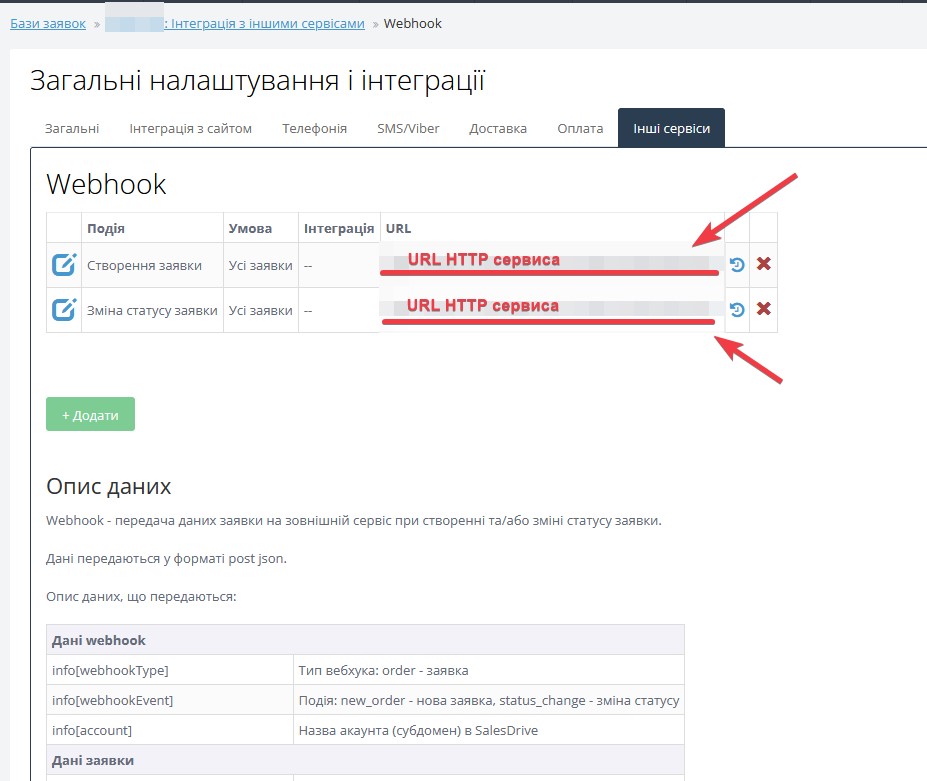
Fig. 4. Where the URL for SalesDrive Webhook is specified.
This solution partially uses the integration functionality with Bitrix24.
In particular, the exchange entity configuration mechanism is used. It allows users to add/modify required fields in the exchange entity in user mode.
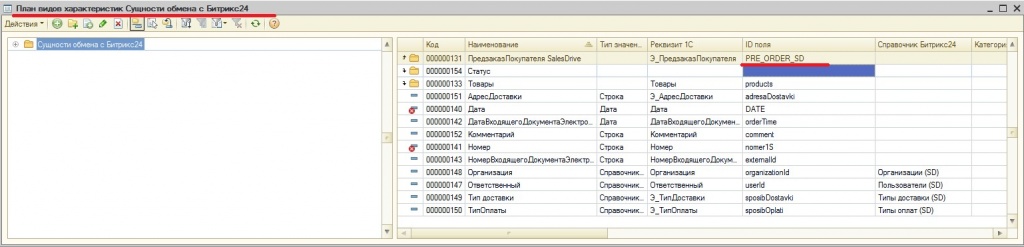
Fig. 5. Exchange entity (Order/Pre-order).
To work with "SalesDrive" API directories, the ability to identify by ID has been added for entity reference values (in the standard integration with Bitrix24, this was not required (and was not available)).
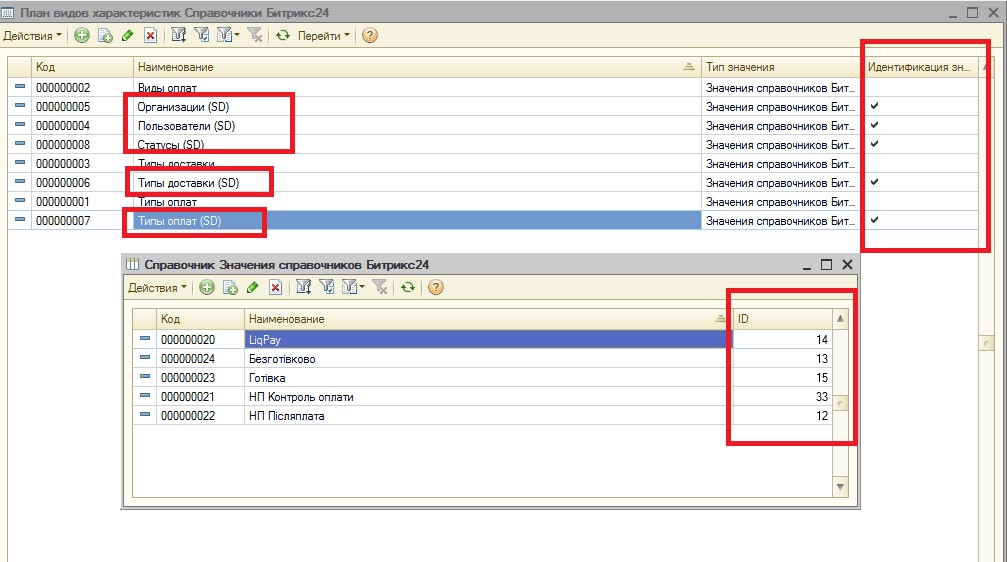
Fig. 6. Exchange entity directories with identification by ID in particular.
Directory value mapping is specified in the same way as in the integration with Bitrix24.

Fig. 7. Configuring "SalesDrive" directory value mapping.
The object ID is stored in the same registry as for Bitrix24. To identify it as a SalesDrive ID, it is written with the prefix "SD_":
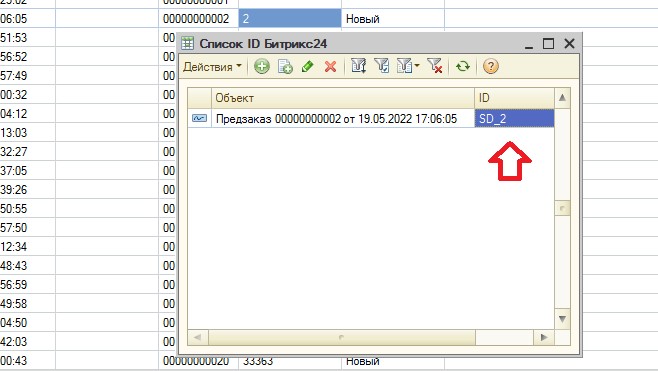
Fig. 8. The "SalesDrive" ID is stored in the same register used in the integration with Bitrix24.
To configure the exchange entity, you can use all the application fields received via Webhook (all fields of the data section in "SalesDrive" JSON Webhook).
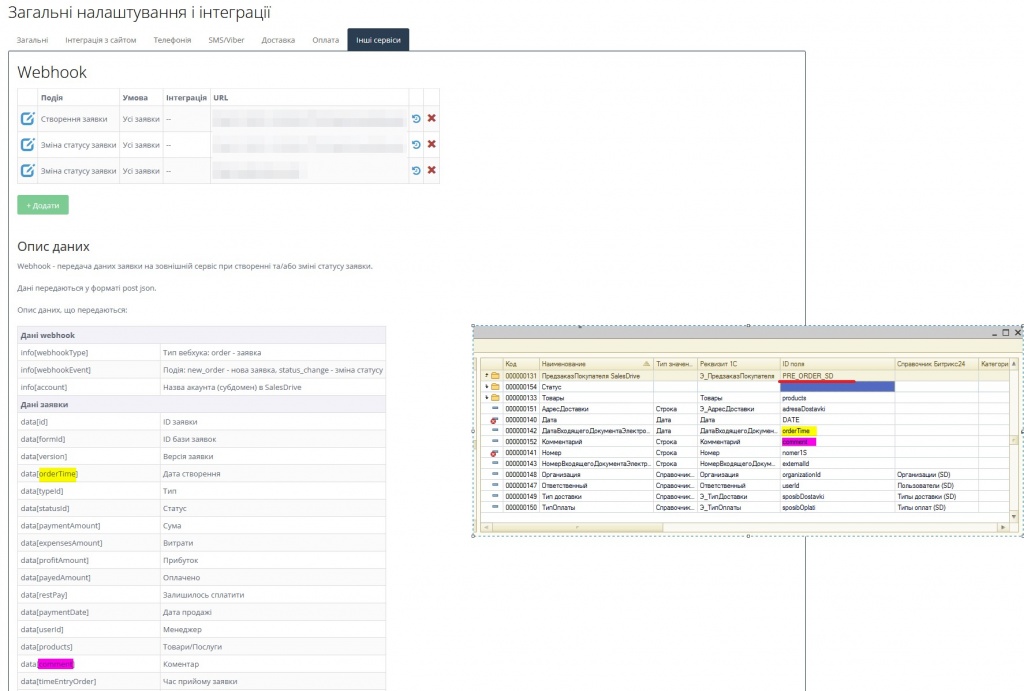
Fig. 9. Principle of configuring the exchange entity for integration with "SalesDrive".
Solution cost:
|
Cost of standard functionality |
12000.00 | |
|
|
|
|
|
Cost of additional functionality
|
Price, UAH | |
| 1. | Downloading products from CRM "SalesDrive" into the accounting system while preserving the structure of nomenclature folders | 4000.00 |
| 2. | Uploading products from the accounting system to CRM "SalesDrive" | 3000.00 |
| 3. | Uploading stock balances to CRM "SalesDrive" | 3000.00 |
| 4. | Downloading payments from CRM "SalesDrive" into the accounting system, linked to sales orders | 4000.00 |
| 5. | Uploading payment data from the accounting system to CRM "SalesDrive" | 4000.00 |
| 6. | Downloading payment receipts from CRM "SalesDrive" into the accounting system | 3000.00 |
| 7. | Downloading additional deal characteristics from CRM "SalesDrive" into the accounting system | 3000.00 |
| 8. | Using nomenclature characteristics when downloading deals in the accounting system | 8000.00 |
| 9. | Uploading prices to CRM "SalesDrive" | 3000.00 |
| 10. | Uploading cost of goods sold (COGS) to CRM "SalesDrive" | 2000.00 |
| 11. | Automatic generation of a sales invoice in the accounting system based on the sales order/invoice by the order/invoice status "Ship" | 3000.00 |
| 12. | Generation of the "Sales Order Closure" document based on the "Sales Order" document if the order status is "Cancelled" | 2000.00 |
| 13. | Generation of the "Sales Return Note" document in the accounting system based on the "Sales Invoice" if the sales invoice exists and the status "Cancelled" appears in the sales order | 3000.00 |
Rights to the module are protected (certificate No. 139214). We provide favorable cooperation conditions for partners.
Throughout our cooperation, NCT specialists demonstrated a high level of professionalism and a deep understanding of business processes. The integration was implemented taking into account all our requirements: the settings were configured carefully and in full, while the solution itself stands out for its technical complexity and maturity — reflecting the team’s experience and responsible approach to project implementation.
We would especially like to highlight the extensive configuration capabilities. Thanks to the coordinated work of NCT specialists, we were able to significantly optimize our internal processes.
We highly recommend NCT as a reliable partner in the field of business automation and system integration.
The module was installed quite quickly, and everything that had been agreed upon was implemented.
If any questions arise during use, the support team responds quickly and professionally.
Thank you for the implementation!
Окремо хочеться наголосити на підтримці протягом тестового періоду — всі питання оперативно вирішувалися, відчувалося повне залучення фахівців до процесу. Інтеграція пройшла максимально комфортно: не призупинялись робочі процеси.
Дуже вдячні Сергію та його команді за високий рівень професіоналізму та якісно виконану роботу!

I am satisfied with the work of NCT specialists on configuring data exchange
between BAS "Accounting" and CRM "Sales Drive."
The deadlines were met, and we received consultation on the solution's
usage.
This solution allows the accountant to quickly and accurately process requests
in BAS "Accounting," saving them at least a third of their working time.
I recommend it! It saves your money and time!
Register if not registered and log in to add a review.
- Integration of the accounting system with CRM "SalesDrive";
- "Batch counterparty upload" processing.
- Integration of the accounting system with CRM "SalesDrive".
- Comments