Integration KeyCRM with BAS Small Business, BAS KUP, BAS ERP, BAS Accounting, BAS UT 3, UNF, FinLite and other configurations on managed forms. Two-way exchange of BAS with KeyCRM
Standard Integration Functionality:
- Uploading deals from "KeyCRM" to the BAS database in real-time;
- Two-way exchange of order statuses between "KeyCRM" and BAS;
- Automatic creation of counterparties in BAS when uploading a deal from "KeyCRM".
Additional Functionality (paid separately):
- Uploading items/products from "KeyCRM" to BAS while preserving the nomenclature folder structure;
- Exporting items/products from BAS to "KeyCRM";
- Exporting stock balances to "KeyCRM";
- Uploading payments from "KeyCRM" to BAS, linked to customer orders;
- Uploading payment data from BAS to "KeyCRM";
- Uploading payment receipts from "KeyCRM" to BAS;
- Loading additional characteristics of deals from "KeyCRM" to the BAS database:
- Delivery method;
- Shipping/Sender;
- Prom.ua website;
- Website page;
- Advertising campaign;
- Source;
- Company (utm_campaign);
- Channel.
- Using nomenclature characteristics when uploading deals to BAS;
- Exporting prices to "KeyCRM";
- Exporting cost price/prime cost to "KeyCRM";
- Automatic generation of an expense invoice in BAS based on the buyer's order/invoice with the order/invoice status "Shipped";
- Formation of the document "Closing the buyer's order" based on the document "Buyer's order", if the order status is "Cancellation";
- Formation of the document "Invoice for return of goods" in BAS, based on the "Outgoing invoice for goods", if the outgoing invoice exists and the status "Cancellation" appears in the buyer's order.
- Delivery method;
- Shipping/Sender;
- Prom.ua website;
- Website page;
- Advertising campaign;
- Source;
- Company (utm_campaign);
- Channel.
Implemented for configurations:
-
BAS Small Business;
-
BAS Accounting. PROF;
-
BAS Accounting. CORP.
Main functionality capabilities
1. Integration with "KeyCRM" allows you to use multiple accounts:
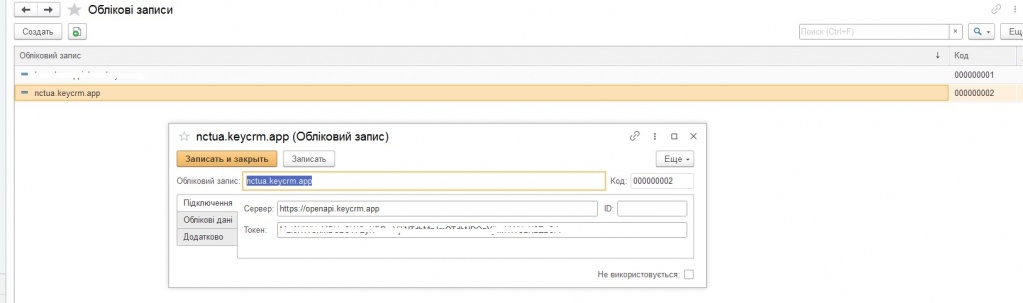 Fig. 1. Account settings.
2. The integration allows you to select a document (Customer Order or Expense Invoice) and a table in which data from "KeyCRM" will be stored without a configurator.
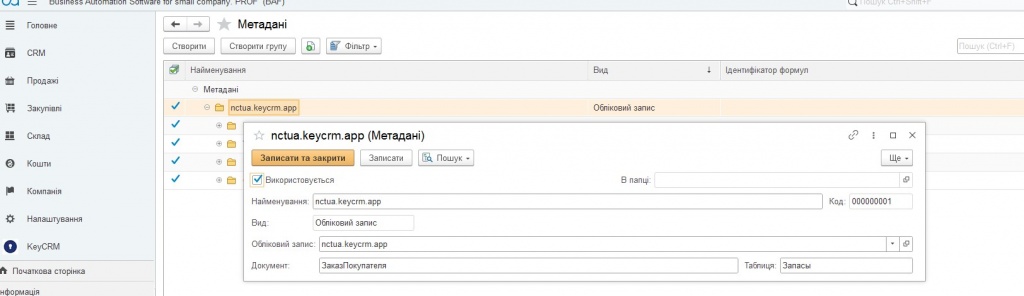
Fig. 2. Setting the document type and name of the tabular part of the order storage "KeyCRM".
3. After selecting the document type, there is a command to fill in the existing details in the specified document, the header details and the tabular part.
4. It is possible to set the correspondence between "KeyCRM" and "BAS" details without a configurator.
-
If the attribute is of the number/string/date/boolean type, it is enough to specify the JSON field and its correspondence to the "BAS" attribute.
-
If this is a link, then you must specify either only the CRM directory, in which case the element will be searched by ID and CRM account, or if it is a counterparty/nomenclature, then the "BAS" directory and its corresponding CRM directory. In this case, you can specify the search fields by which the search will be performed. If 1 matching record is found according to the search results by fields, then it is assumed that a match has been found, in other cases, when the search results are 0 or more than 1 record, it is assumed that such data is missing from the directory.
If the attribute is of the number/string/date/boolean type, it is enough to specify the JSON field and its correspondence to the "BAS" attribute.
If this is a link, then you must specify either only the CRM directory, in which case the element will be searched by ID and CRM account, or if it is a counterparty/nomenclature, then the "BAS" directory and its corresponding CRM directory. In this case, you can specify the search fields by which the search will be performed. If 1 matching record is found according to the search results by fields, then it is assumed that a match has been found, in other cases, when the search results are 0 or more than 1 record, it is assumed that such data is missing from the directory.
5. It is possible to set a programmatic processing of the attribute value determination for a field. In the "BAS" language, an arbitrary algorithm is executed, the result of which is assigned to the global variable E_Value, and will be set as the attribute value.
6. It is possible to set a default value for a property.
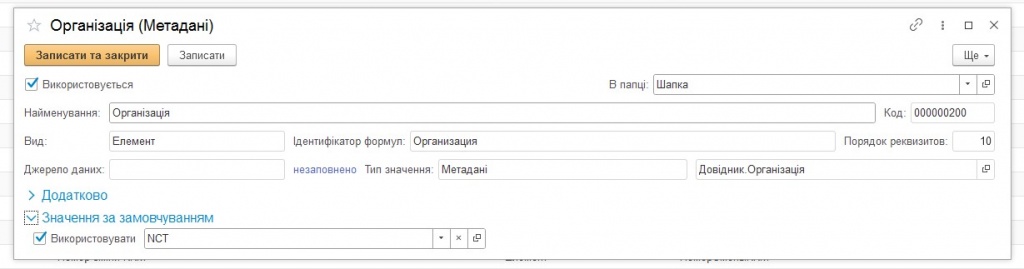
Fig. 3. Setting default props.
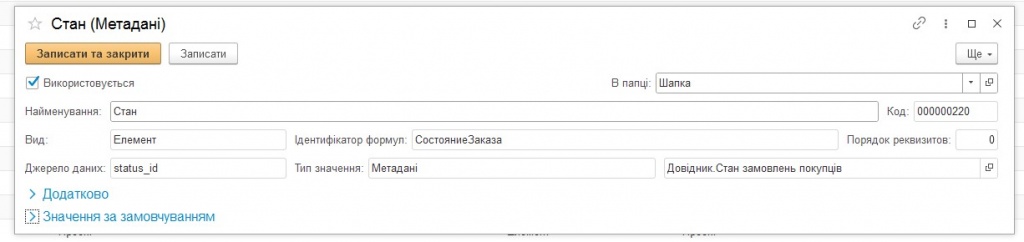
Fig. 4. Establishing correspondence between the received order details "status_id" "KeyCRM" and the "Order Status" "BAS" details.
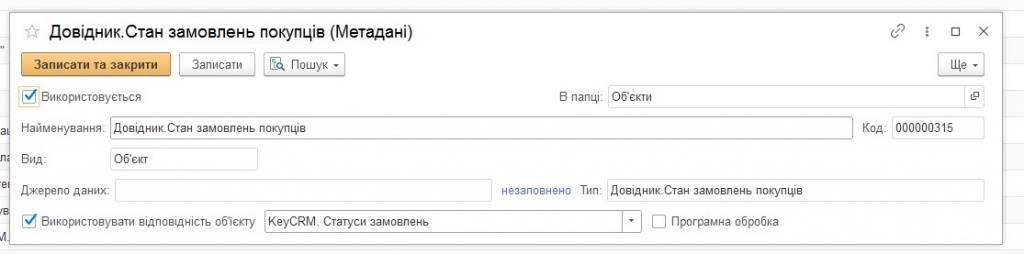
Fig. 5. Establishing correspondence between the "KeyCRM" directory and the "BAS" directory.
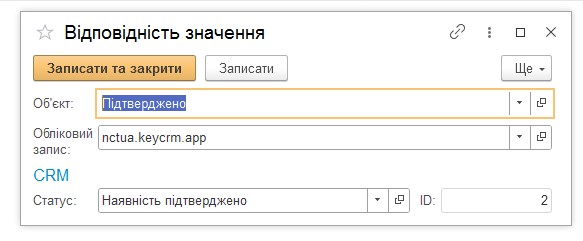
Fig. 6. Establishing correspondence between the value of the "Object" attribute of the "BAS" directory and the value of the "Status" attribute of "KeyCRM".
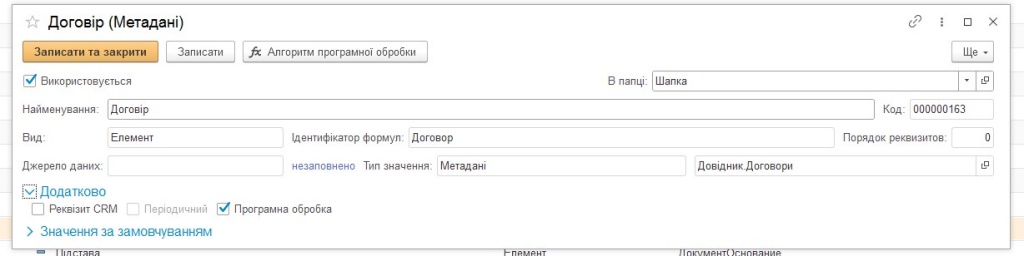
Fig. 7. Setting up software processing for obtaining the value of the "Agreement" attribute.
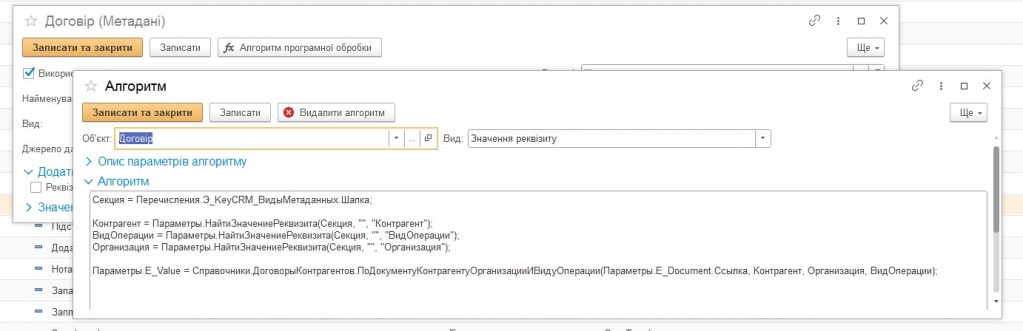
Fig. 8. Algorithm for programmatically obtaining the value of the "Agreement" attribute.
7. After receiving all the details, it is possible to execute an arbitrary algorithm for a completed but not yet saved document.
8. To receive data from CRM, there is both an http service for receiving webhooks from CRM, and scheduled tasks for receiving both new and changed orders, as well as a scheduled task for uploading orders created in "BAS" to CRM.
9. In the integration subsystem, there are directories similar to CRM directories, and a correspondence register, where the correspondence between CRM and "BAS" values is established.
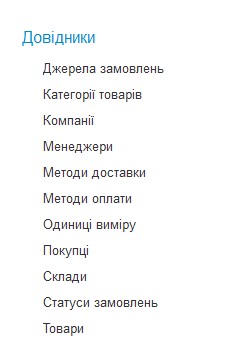
Fig. 9. "KeyCRM" References.
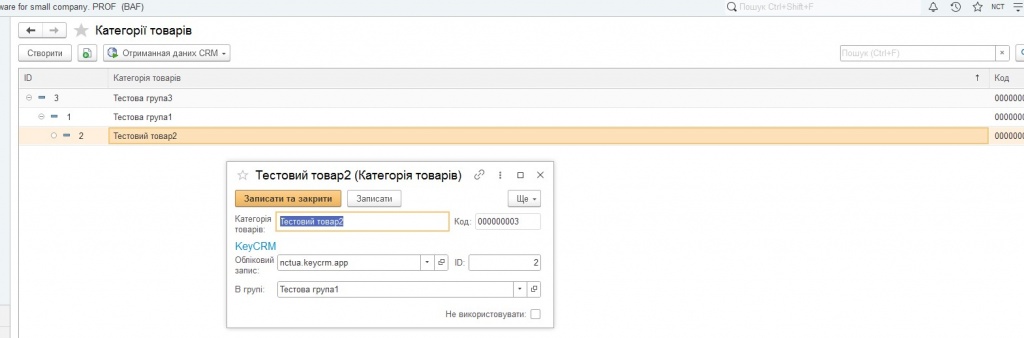
Fig. 10. Product categories.
10. For CRM products, the correspondence to the "BAS" nomenclature is not set. The correspondence of the CRM product to the "BAS" nomenclature is set using the "Item" attribute. There is a setting that allows you to automatically create the "BAS" nomenclature for a missing CRM product.
11. Processing of data received from CRM is divided into two stages:
-
Receiving data and recording it in the appropriate register for further processing.
-
Processing the received data and writing the data into a document.
Receiving data and recording it in the appropriate register for further processing.
Processing the received data and writing the data into a document.
This ensures that there is no loss of data processing in the event of an unforeseen error. After analyzing the occurrence of the error, it is possible to re-process this data.
This also allows only receiving input data without losing it, in the case of performing long routine or other operations that may affect the reliability of the data with its further processing.
12. There is a routine task for unloading free balances from "BAS" to CRM.
13. There is a closed part related to the right to use integration.
Solution Cost:
| Standard functionality cost | 12000.00 | |
|
Additional functionality cost
|
Price, UAH | |
| 1. | Importing products from "KeyCRM" to "BAS" while maintaining the nomenclature folder structure | 4000.00 |
| 2. | Exporting products from "BAS" to "KeyCRM" | 3000.00 |
| 3. | Exporting stock balances to "KeyCRM" | 3000.00 |
| 4. | Importing payments from "KeyCRM" to "BAS", with linking to customer orders | 4000.00 |
| 5. | Exporting payment data from "BAS" to "KeyCRM" | 4000.00 |
| 6. | Uploading payment receipts from "KeyCRM" to BAS | 3000.00 |
| 7. | Importing additional deal characteristics from "KeyCRM" to the "BAS" database | 3000.00 |
| 8. | Using nomenclature characteristics when uploading deals to BAS | 8000.00 |
| 9. | Exporting prices to "KeyCRM" | 3000.00 |
| 10. | Exporting cost price to "KeyCRM" | 2000.00 |
| 11. | Automatic generation of sales invoices in "BAS" based on customer order/proforma invoice by "Ship" order/invoice status | 3000.00 |
| 12. | Formation of the document "Closing the buyer's order" based on the document "Buyer's order", if the order status is "Cancellation" | 2000.00 |
| 13. | Formation of the document "Invoice for return of goods" in "BAS", based on the "Outgoing invoice for goods", if the outgoing invoice exists and the status "Cancellation" appears in the buyer's order | 3000.00 |
Developer: LLC "NCT"
Register if not registered and log in to add a review.
- Integration of "BAS Accounting" with "KeyCRM".
- Comments